Skipping Rope
Drawing a Player
In this tutorial we're going to make a little Skipping Rope game.
Let's start by drawing a happy little jumping player character.
Create a new project, and place our regular loop inside it.
Repeat
CLS
ResetDraw


Flip
Forever
From here, click into the Image Editor (in the tools menu on the top right of the screen)
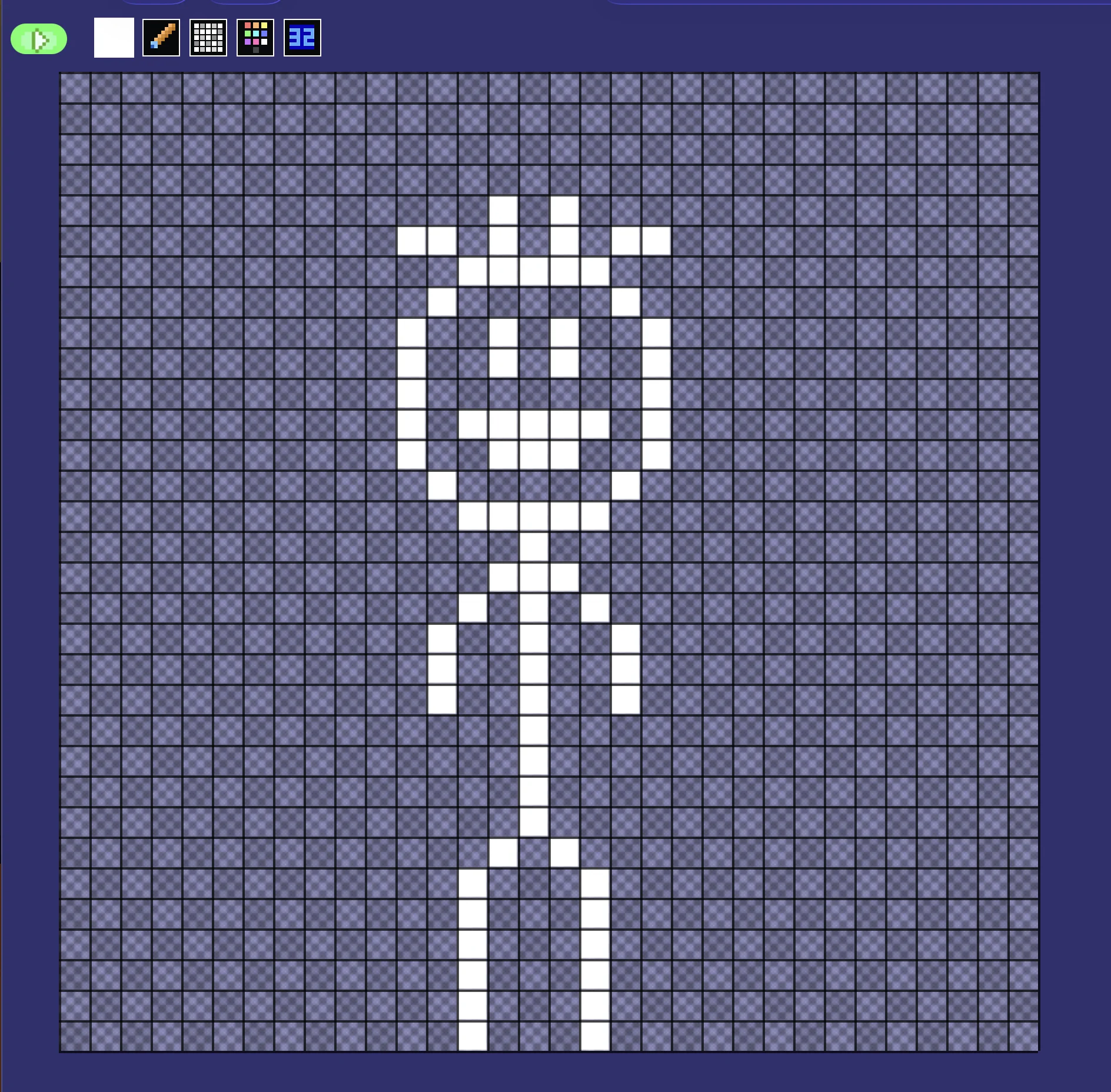
Draw a figure.
What to Draw?
We need to draw a character for our player.
There's no real rules for what this character should look like.
Be as creative as you'd like, but be sure that the player touches the bottom of the sprite area, so that they look like they're touching the floor.
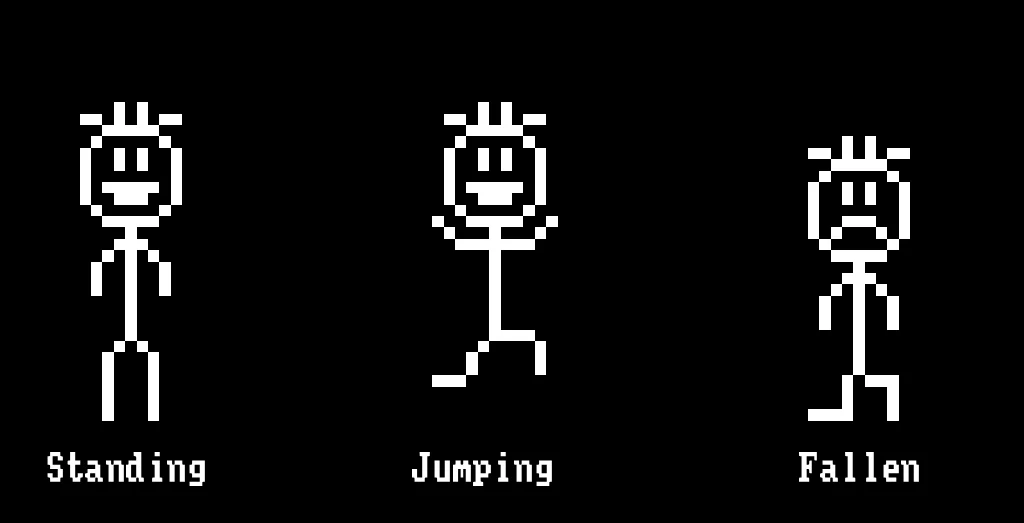
Standing, Jumping, Fallen
We need to draw three frames for our player.
One standing on the ground, a second leaping happily through the air, and a third that has failed, and fallen.
Player Setup
We'll initialise the player's position with a few data points.
For the player to work, we need their X and Y positions, a Y Speed for their leaping movement.
We also need to keep track of whether they've Failed, as well as how many Skips they managed.
// Set up Player
PlayerX=320
PlayerY=240
PlayerYSpeed=0
PlayerFailed=0
PlayerSkips=0
You can place these variables under the Symbols that should have been added to your code.
Inside the main loop, for now, we'll just draw the basic player standing on the ground.
  ShowImage=0
  DrawImg PlayerX,PlayerY,ShowImage
For the movement, let's start with Gravity!
This isn't as complicated as it sounds.
Gravity
Gravity should always be pushing our player downwards, so we'll start by adding Gravity to our PlayerYSpeed every frame.
That way, the Y Speed is always being pushed down.
  // Set the speed of Gravity
  Gravity=1
    // Add the Gravity to the Player's Y Speed
  PlayerYSpeed=PlayerYSpeed+Gravity
Next, we need to add that Speed to the Position of our player.
  // Add the Speed to the Position
    // But limit to the top and middle of the screen.
  PlayerY=Limit(PlayerY+PlayerYSpeed,0,240)
Cool, but we're still not jumping, yet.
The Only Way is Up
In order to jump, all we really need to do is set the Y Speed to a negative (minus) number.
Then, each frame, Gravity will increase the Y Speed, until the player falls back down to earth.
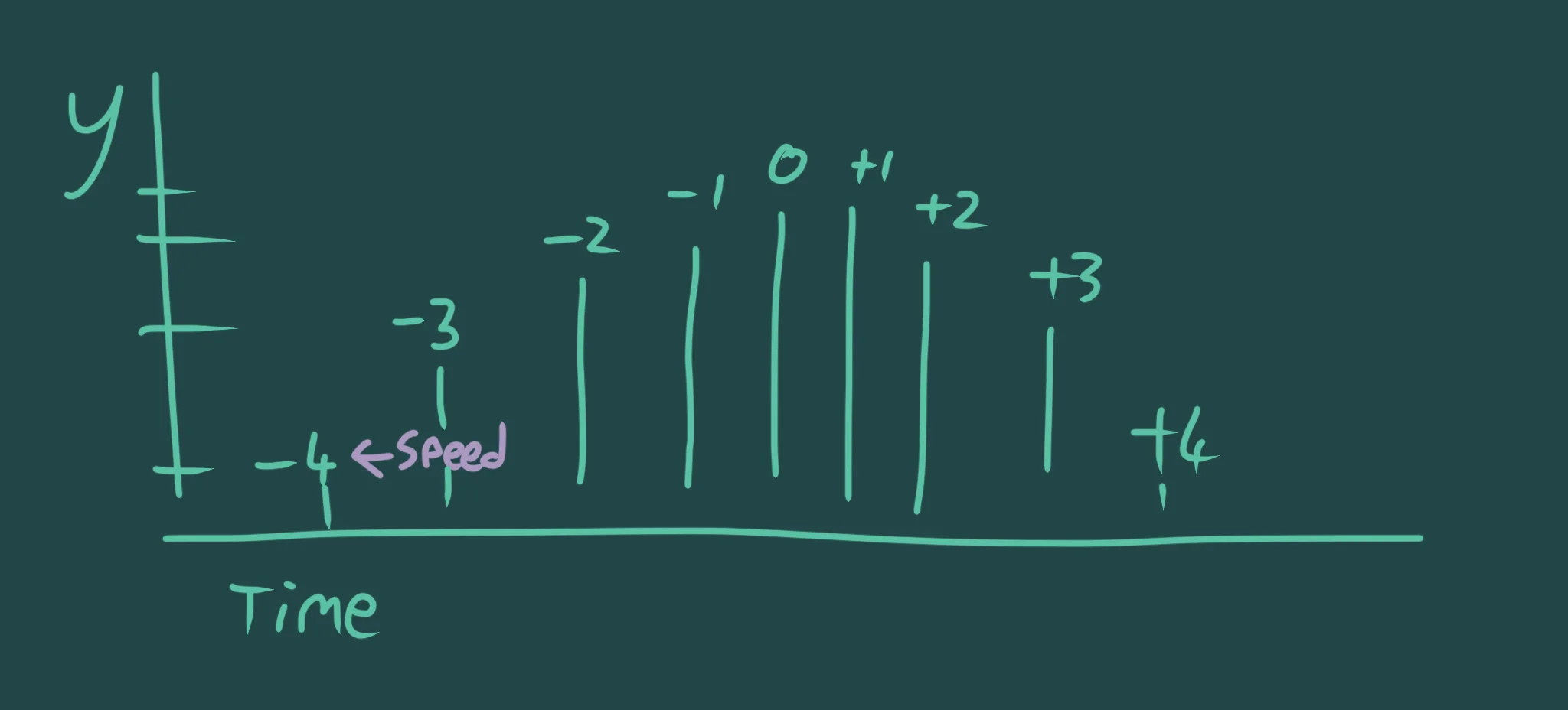
Gravity keeps adding to the Y Speed.
We'll make sure the Jump Button only works if the player is on the ground, too.
  // Jump Button
  If GamePad(ButtonA) And PlayerY==240 then PlayerYSpeed=-10
If you hold on to the Jump button, you'll find our player hops like a chaotic bunny.
To prevent these bunny hops, we're going to need a Toggle.
Only Once
We'll call this toggle "NoJump".
We'll toggle it on when the jump happens, and turn it back off when the Jump Button has been released.
As long as we check that the toggle is Off, then we know it's safe to do a new jump.
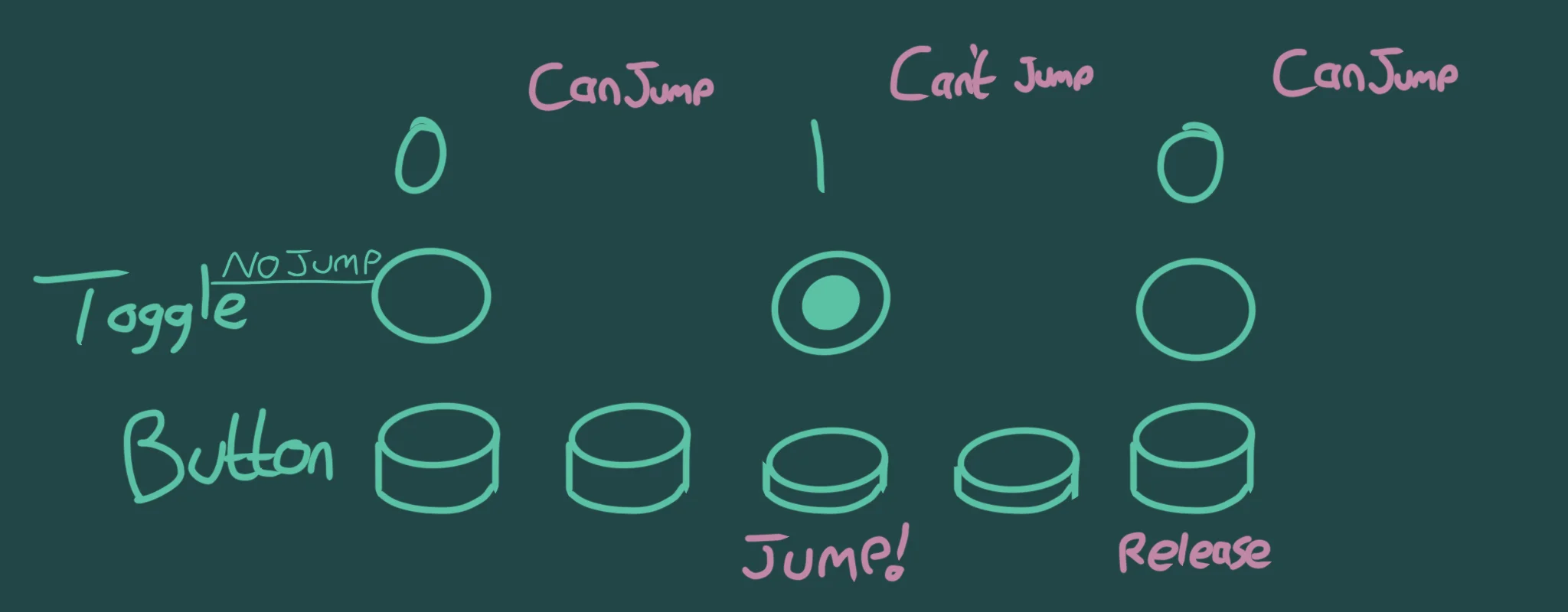
Toggle on, Toggle off!
Let's change the Jump Button to account for our new toggle.
  // Jump Button
    // Turn the NoJump toggle off when the button is released
  If GamePad(ButtonA)==0 then NoJump=0

    // Only jump if On the floor, and NoJump is off.
  If GamePad(ButtonA) And PlayerY==240 and NoJump==0
    PlayerYSpeed=-10  // Jump upwards
    NoJump=1      // Turn the toggle on.
  endif
Our Program so far
// Hopping Hyxil
// by Mr Green
// Created 2026/2/24

Symbol 0,"2__0_0_0_0_0_0_0_0_0_0_0_0_0_0_0_0/;0;0_0_0@;;0;0;0;;0_0_0/;?0_0_0@;0?;0_0_0!;00;0;00;0_0_0?;00;0;00;0_0_0?;0/;0_0_0?;0;?0;0_0_0?;00;,00;0_0_0!;0?;0_0_0@;?0_0_0_00;0_0_0_0,;,0_0_0_0;0;0;0_0_0@;00;00;0_0_0/;00;00;0_0_0/;00;00;0_0_0_0;0_0_0_0.;0_0_0_0.;0_0_0_0.;0_0_0_0,;0;0_0_0_0;0,;0_0_0_;0,;0_0_0_;0,;0_0_0_;0,;0_0_0_;0,;0_0_0_;0,;";
Symbol 1,"2__0_0_0_0_0_0_0_0_0_0_0_0_0_0_0_0/;0;0_0_0@;;0;0;0;;0_0_0/;?0_0_0@;0?;0_0_0!;00;0;00;0_0_0?;00;0;00;0_0_0?;0/;0_0_0?;0;?0;0_0_0?;00;,00;0_0_0!;0?;0_0_0?;00;?00;0_0_0.;0,;0,;0_0_0!;/0_0_0_0;0_0_0_0.;0_0_0_0.;0_0_0_0.;0_0_0_0.;0_0_0_0.;0_0_0_0.;0_0_0_0.;.0_0_0_;0.;0_0_0/;0?;0_0_0/;0?;0_0_0.;,";
Symbol 2,"2__0_0_0_0_0_0_0_0_0_0_0_0_0_0_0_0_0_0_0_0_0_0_0_0_0_0_0.;0;0_0_0@;;0;0;0;;0_0_0/;?0_0_0@;0?;0_0_0!;00;0;00;0_0_0?;00;0;00;0_0_0?;0/;0_0_0?;00;,00;0_0_0?;0;0,;0;0_0_0!;0?;0_0_0@;?0_0_0_00;0_0_0_0,;,0_0_0_0;0;0;0_0_0@;00;00;0_0_0/;00;00;0_0_0/;00;00;0_0_0_0;0_0_0_0.;0_0_0_0.;0_0_0_0.;0_0_0_0,;0;,0_0_0_;0,;0_0_0_;0,;0_0_0!;.0,;";

// Set up Player
PlayerX=320
PlayerY=240
PlayerYSpeed=0
PlayerFailed=0
PlayerSkips=0

Repeat
CLS
ResetDraw

  // Set the speed of Gravity
  Gravity=1
    // Add the Gravity to the Player's Speed
  PlayerYSpeed=PlayerYSpeed+Gravity
  // Add the Speed to the Position
    // But limit to the top and middle of the screen.
  PlayerY=Limit(PlayerY+PlayerYSpeed,0,240)

  // Jump Button
    // Turn the NoJump toggle off when the button is released
  If GamePad(ButtonA)==0 then NoJump=0

    // Only jump if On the floor, and NoJump is off.
  If GamePad(ButtonA) And PlayerY==240 and NoJump==0
    PlayerYSpeed=-10  // Jump upwards
    NoJump=1      // Turn the toggle on.
  endif


  ShowImage=0
  DrawImg PlayerX,PlayerY,ShowImage

Flip
Forever
We've set the Jump to -10. If you change that number, the player will jump up at a different speed.
You can also try changing the value of Gravity to make the jumps more floaty!
Crafting a Rope
We're going to need a rope, and this is a more complicated section!
Sin and Cos will both give us a nice smooth gliding number from -1 to 1, when we give it a number from 0 to 360.
The smooth glide forms a loop, from -1 (when we give it 0) up to 1 (when we give it 180), then back to -1 again (when we give it 360).
This then loops endlessly, going around and around.
For the movement of the rope, we're going to use the Cos() function, and a Spin variable.
Spin will go from 0 to 360, and when it hits 360, that's when Cos() is at its looping point.
You can see the basic idea of what we're going to make, if you run this separate example.
Repeat
CLS

  // Keep the spin spinning
  Spin=Spin+4
  if Spin>360
    PlaySFX("Metal_2")
    Spin=Spin-360
  endif

  // Multiply by 52 to scale up from 1 to 52.
  Depth=Cos(Spin)*52

  // Where is the Depth?
  Line 0,200+Depth,640,200+Depth

Flip
Forever
This draws a line across the screen, based on the Cos(Spin) value.
When it's at this lowest point, we can trigger a sound effect, and then reset the Spin back by 360 so it loops neatly.
By using Cos(Spin), then multiplying it by 52, and adding that value to 200, we get a nice height for the middle of our rope.
When the rope is at its lowest (200+52 = 252), it will be just above the floor in our game, and 200-52 which is higher than the player.
This way, when we're skipping, the rope will go over and under the player.
Making it Ropey
The Sin of an X value will give us a nice wave effect.
Repeat
CLS

  For J=0 to 180
    X=(320-90)+J // Centre the X values on the screen
    Y=200+Sin(J)*52
    Plot X,Y
  Next

Flip
Forever
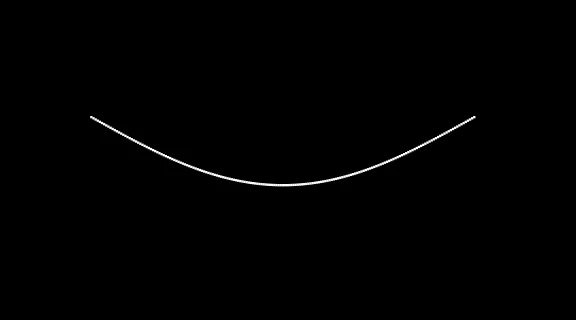
Oooh, now that's more like a rope!
Now let's combine these two elements together, to make a spinning rope.
Instead of multiplying by 52, we can multiply by the Depth that we set up.
Repeat
CLS

  // Keep the spin spinning
  Spin=Spin+4
  if Spin>360
    PlaySFX("Metal_2")
    Spin=Spin-360
  endif

  // Multiply by 52 to scale up from 1 to 52.
  Depth=Cos(Spin)*52

  // Where is the Depth?
  //Line 0,200+Depth,640,200+Depth
  // We don't need to draw this any more!

  // Rope
  For J=0 to 180
    X=(320-90)+J // Centre the X values on the screen
      // Multiply by Depth instead of 52
    Y=200+Sin(J)*Depth
    Plot X,Y
  Next

Flip
Forever
Combine!
OK, let's take our rope code and put it inside our game.
Take out the Repeat, CLS and Flip, Forever, then copy+paste the rest across.
// Hopping Hyxil
// by Mr Green
// Created 2026/2/24

Symbol 0,"2__0_0_0_0_0_0_0_0_0_0_0_0_0_0_0_0/;0;0_0_0@;;0;0;0;;0_0_0/;?0_0_0@;0?;0_0_0!;00;0;00;0_0_0?;00;0;00;0_0_0?;0/;0_0_0?;0;?0;0_0_0?;00;,00;0_0_0!;0?;0_0_0@;?0_0_0_00;0_0_0_0,;,0_0_0_0;0;0;0_0_0@;00;00;0_0_0/;00;00;0_0_0/;00;00;0_0_0_0;0_0_0_0.;0_0_0_0.;0_0_0_0.;0_0_0_0,;0;0_0_0_0;0,;0_0_0_;0,;0_0_0_;0,;0_0_0_;0,;0_0_0_;0,;0_0_0_;0,;";
Symbol 1,"2__0_0_0_0_0_0_0_0_0_0_0_0_0_0_0_0/;0;0_0_0@;;0;0;0;;0_0_0/;?0_0_0@;0?;0_0_0!;00;0;00;0_0_0?;00;0;00;0_0_0?;0/;0_0_0?;0;?0;0_0_0?;00;,00;0_0_0!;0?;0_0_0?;00;?00;0_0_0.;0,;0,;0_0_0!;/0_0_0_0;0_0_0_0.;0_0_0_0.;0_0_0_0.;0_0_0_0.;0_0_0_0.;0_0_0_0.;0_0_0_0.;.0_0_0_;0.;0_0_0/;0?;0_0_0/;0?;0_0_0.;,";
Symbol 2,"2__0_0_0_0_0_0_0_0_0_0_0_0_0_0_0_0_0_0_0_0_0_0_0_0_0_0_0.;0;0_0_0@;;0;0;0;;0_0_0/;?0_0_0@;0?;0_0_0!;00;0;00;0_0_0?;00;0;00;0_0_0?;0/;0_0_0?;00;,00;0_0_0?;0;0,;0;0_0_0!;0?;0_0_0@;?0_0_0_00;0_0_0_0,;,0_0_0_0;0;0;0_0_0@;00;00;0_0_0/;00;00;0_0_0/;00;00;0_0_0_0;0_0_0_0.;0_0_0_0.;0_0_0_0.;0_0_0_0,;0;,0_0_0_;0,;0_0_0_;0,;0_0_0!;.0,;";

// Set up Player
PlayerX=320
PlayerY=240
PlayerYSpeed=0
PlayerFailed=0
PlayerSkips=0

Repeat
CLS
ResetDraw

// This is the rope code
  // Keep the spin spinning
  Spin=Spin+4
  if Spin>360
    PlaySFX("Metal_2")
    Spin=Spin-360
  endif

  // Multiply by 52 to scale up from 1 to 52.
  Depth=Cos(Spin)*52

  // Where is the Depth?
  //Line 0,200+Depth,640,200+Depth
  // We don't need to draw this any more!

  // Rope
  For J=0 to 180
    X=(320-90)+J // Centre the X values on the screen
      // Multiply by Depth instead of 52
    Y=200+Sin(J)*Depth
    Plot X,Y
  Next
// Rope section


  // Set the speed of Gravity
  Gravity=1
    // Add the Gravity to the Player's Speed
  PlayerYSpeed=PlayerYSpeed+Gravity
  // Add the Speed to the Position
    // But limit to the top and middle of the screen.
  PlayerY=Limit(PlayerY+PlayerYSpeed,0,240)

  // Jump Button
    // Turn the NoJump toggle off when the button is released
  If GamePad(ButtonA)==0 then NoJump=0

    // Only jump if On the floor, and NoJump is off.
  If GamePad(ButtonA) And PlayerY==240 and NoJump==0
    PlayerYSpeed=-10  // Jump upwards
    NoJump=1      // Turn the toggle on.
  endif


  ShowImage=0
  DrawImg PlayerX,PlayerY,ShowImage

Flip
Forever
Now all we need is some gameplay.
This can all go inside the "Spin>360" If-Endif section.
All we need to do is check if PlayerY is too close to the floor when the rope is at its limit.
Since the floor is at 240, we'll use 220 as our "over the rope" height.
Let's add an extra If into the "If Spin" section, to check if we're under or over this 220 position.
    If PlayerY>220  // Too close to the floor
      PlayerFailed=1
      PlaySFX("Beeper_Fruit_Lose")
    Else      // Jumped over the rope
      PlayerSkips=PlayerSkips+1
      PlaySFX("Pickup_8")
    Endif
Scores
Finally, we'll give our player a score.
Show the PlayerSkips in the corner.
  // Display the Score
  SetFontSize 64
  Text 64,64,PlayerSkips,1
And reset the score if they fail.
    // If we fail
  If PlayerFailed==1
      // Reset the Score
    PlayerSkips=0
      // Reset the Fail
    PlayerFailed=0
  EndIf
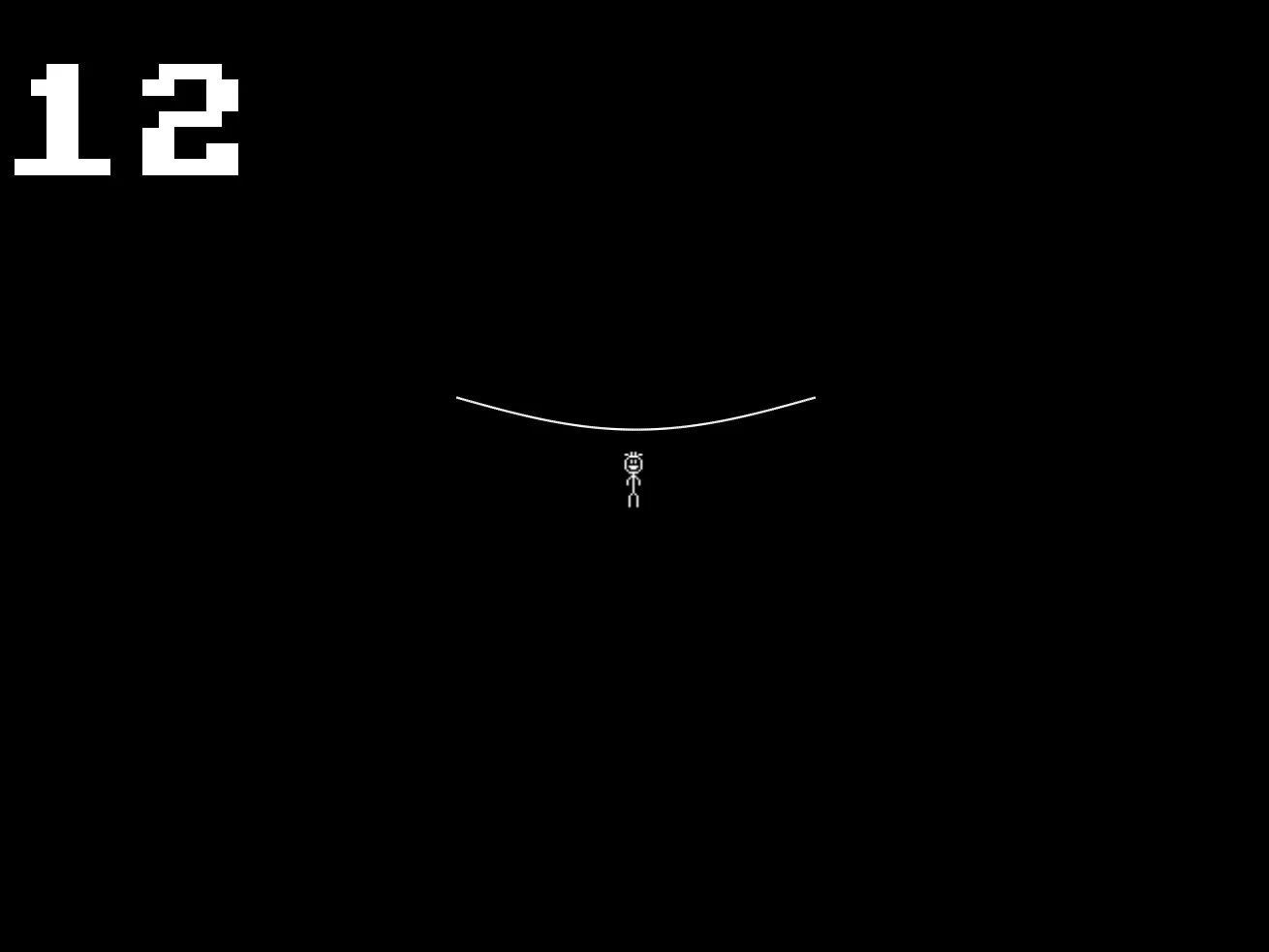
Skipping Time!
Our Program so far
// Hopping Hyxil - Final
// by Mr Green
// Created 2026/2/24

Symbol 0,"2__0_0_0_0_0_0_0_0_0_0_0_0_0_0_0_0/;0;0_0_0@;;0;0;0;;0_0_0/;?0_0_0@;0?;0_0_0!;00;0;00;0_0_0?;00;0;00;0_0_0?;0/;0_0_0?;0;?0;0_0_0?;00;,00;0_0_0!;0?;0_0_0@;?0_0_0_00;0_0_0_0,;,0_0_0_0;0;0;0_0_0@;00;00;0_0_0/;00;00;0_0_0/;00;00;0_0_0_0;0_0_0_0.;0_0_0_0.;0_0_0_0.;0_0_0_0,;0;0_0_0_0;0,;0_0_0_;0,;0_0_0_;0,;0_0_0_;0,;0_0_0_;0,;0_0_0_;0,;";
Symbol 1,"2__0_0_0_0_0_0_0_0_0_0_0_0_0_0_0_0/;0;0_0_0@;;0;0;0;;0_0_0/;?0_0_0@;0?;0_0_0!;00;0;00;0_0_0?;00;0;00;0_0_0?;0/;0_0_0?;0;?0;0_0_0?;00;,00;0_0_0!;0?;0_0_0?;00;?00;0_0_0.;0,;0,;0_0_0!;/0_0_0_0;0_0_0_0.;0_0_0_0.;0_0_0_0.;0_0_0_0.;0_0_0_0.;0_0_0_0.;0_0_0_0.;.0_0_0_;0.;0_0_0/;0?;0_0_0/;0?;0_0_0.;,";
Symbol 2,"2__0_0_0_0_0_0_0_0_0_0_0_0_0_0_0_0_0_0_0_0_0_0_0_0_0_0_0.;0;0_0_0@;;0;0;0;;0_0_0/;?0_0_0@;0?;0_0_0!;00;0;00;0_0_0?;00;0;00;0_0_0?;0/;0_0_0?;00;,00;0_0_0?;0;0,;0;0_0_0!;0?;0_0_0@;?0_0_0_00;0_0_0_0,;,0_0_0_0;0;0;0_0_0@;00;00;0_0_0/;00;00;0_0_0/;00;00;0_0_0_0;0_0_0_0.;0_0_0_0.;0_0_0_0.;0_0_0_0,;0;,0_0_0_;0,;0_0_0_;0,;0_0_0!;.0,;";
Symbol 3,"2__V_V_V_V_V_V_V_V_V_V_V_V_V_V_V_V_V_V_V_V_V_V_V_V_V_V_V_V_V_V_V_V_V_V_V_V_V_V_V_V_V_V_V_V_V_V_V_V_V_V_V_V_V_V,R_R_R_R_R_R_R_R_R_R_R_R_R_R_R_R_R_R_R_R_R_R_R_R_R_R_R_R_R_R_R_R_R_R_R_R_R_R_R_R_R_R_R_R_R_R_R_R_R_R_R_R_R_R_R_R_R_R_R_R_R.";

// Set up Player
PlayerX=320
PlayerY=240
PlayerYSpeed=0
PlayerFailed=0
PlayerSkips=0

Repeat
CLS
ResetDraw

// This is the rope code
  // Keep the spin spinning
  Spin=Spin+4
  if Spin>360
    PlaySFX("Metal_2")
    Spin=Spin-360

    If PlayerY>220  // Too close to the floor
      PlayerFailed=1
      PlaySFX("Beeper_Fruit_Lose")
    Else      // Jumped over the rope
      PlayerSkips=PlayerSkips+1
      PlaySFX("Pickup_8")
    EndIf

  EndIf

  // Multiply by 52 to scale up from 1 to 52.
  Depth=Cos(Spin)*52

  // Where is the Depth?
  //Line 0,200+Depth,640,200+Depth
  // We don't need to draw this any more!

  // Rope
  For J=0 to 180
    X=(320-90)+J // Centre the X values on the screen
      // Multiply by Depth instead of 52
    Y=200+Sin(J)*Depth
    Plot X,Y
  Next
// Rope section


  // Set the speed of Gravity
  Gravity=1
    // Add the Gravity to the Player's Speed
  PlayerYSpeed=PlayerYSpeed+Gravity
  // Add the Speed to the Position
    // But limit to the top and middle of the screen.
  PlayerY=Limit(PlayerY+PlayerYSpeed,0,240)

  // Jump Button
    // Turn the NoJump toggle off when the button is released
  If GamePad(ButtonA)==0 then NoJump=0

    // Only jump if On the floor, and NoJump is off.
  If GamePad(ButtonA) And PlayerY==240 and NoJump==0
    PlayerYSpeed=-10  // Jump upwards
    NoJump=1      // Turn the toggle on.
  EndIf


  ShowImage=0
  DrawImg PlayerX,PlayerY,ShowImage

  // Display the Score
  SetFontSize 64
  Text 64,64,PlayerSkips,1

    // If we fail
  If PlayerFailed==1
      // Reset the Score
    PlayerSkips=0
      // Reset the Fail
    PlayerFailed=0
  EndIf

Flip
Forever
I'm going to leave you with a few things to do by yourself.
Sprites
First, we set up a variable called ShowImage, but haven't shown anything other than the standing sprite.
Can you decide how best to change this, for the Jumping and Failed sprites to show up at the right times.
Highscore
Why not create a highscore value, and display that on the opposite side of the screen.
If the number of skips is higher than the highscore value, update the highscore value to match it!
Random!
The rope is constantly Spinning at a constant speed.
How about, every time it hits >360, you change the speed that the rope spins at?
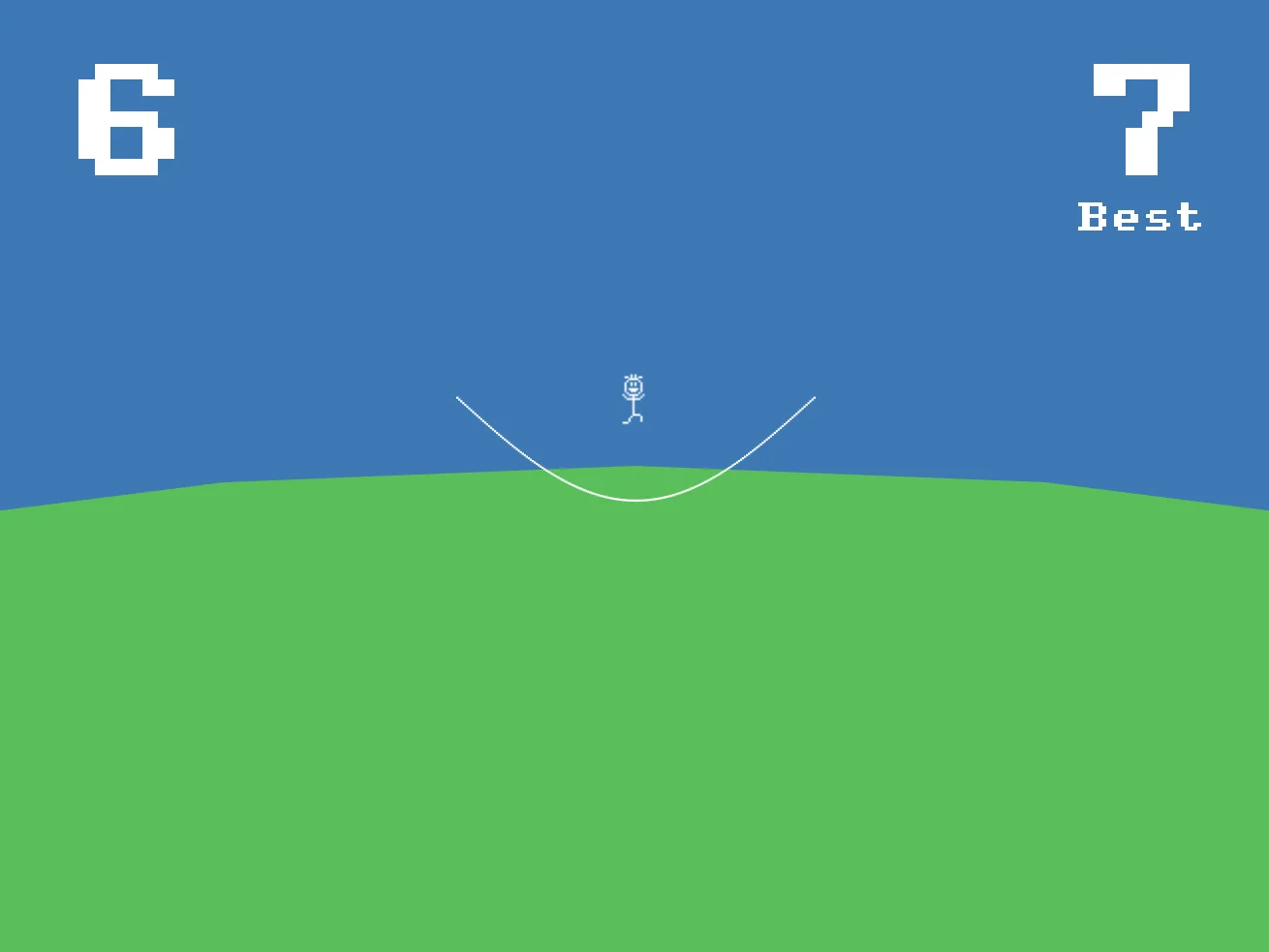
Beautify!
Background
I've added a nice blue sky and green hill for the skipping to take place on.
What sort of background can you come up with?