Collision
A Hidden Number
So far we've seen two types of commands. The ones that "Do", like Print and Text and DrawImg, and the ones that "Return", like Limit, Wrap and Rand.
But the thing about DrawImg (and Rect, Oval and more) is that they can actually Return a Value, too!
Repeat
CLS

  A=Oval(100,100,64,32)
  Print A

Flip
Forever
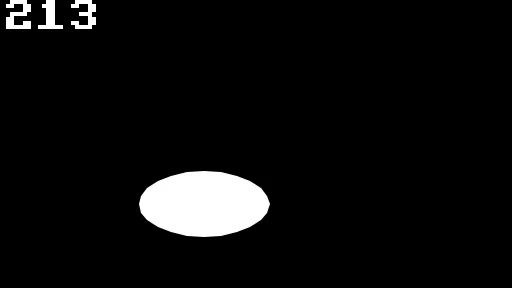
Values from an Oval?
What is it counting?
Each of these values is a Collision ID, and can go from 0 up to 5000.
Most of the Drawing commands will return one of these IDs, which point to a collision boundary.
Colliding
The Collide command lets us test one of these IDs against another ID, and will Return True if the two Draw Commands overlap (or collide with) each other.
Repeat
CLS

  SetCol 255,255,255
  If Collide(A,B) Then SetCol 255,0,0

  A=Oval(100,100,64,32)
  Print A
  B=Oval(MouseX(),MouseY(),32,64)
  Print B

Flip
Forever

The Ovals turn Red when they touch
We give the Collide command two of these values, and if they touched when their boundary was set, then it returns True.
We should try to keep these values as up to date as we can. Keeping an old value from a couple of minutes earlier won't help much :D
We can use those Values to test if one thing touches another!
Our game, so far.
// My Game
// by Mr Green
// Created 2025/12/16

Symbol 0,"2__0_0_0_0_0_0_0_0_0_0_0_0_0_0_0_0_0_0_0P?0_0/P?0!P0,P0_0/P0,P0?P,00P0_0/P00P,0.P,00P0_0/P00P,0.P,00P0_0/P00P,0.P,00P!0!P!00P,0_0?P@0_0_0_0_0_0/P!0.P!0_0_0_0_0_0.P?0PP0P?0_0_0!PP0_0_0/P.0PP0P.0_0_0/PP0_0_0_0,PP0_0@P_P,0PP0P_P,0.P0_0_0@P0.P0_0_0@P0.P0_0_0@P0.P0@P0@P0@P0.PP0/P0@P0/PP0?P0/P0P!0P0/P0!P?0,P0@P0,P?0@P,0,P0@P0,P,0_0?P,0@P,";
Symbol 1,"2__0_0_0_0_0_0_0_0_0_0_0_0_0_0_00P,0_0_0@P_P,0_0?P_P,0?P0_0?P0?P,0@P0_0?P0_0/P0_0?P0_0/P?0!P?0_0_00P0!P0_0_0!P@0_0_0_0_0_0/P!0.P!0_0_0_0_0_0.P?0PP0P?0_0_0!PP0_0_0/P.0PP0P.0_0_0/PP0_0_0_0,PP0_0!P_P?0PP0P_P!0_0_0_0,PP0_0_0_0,PP0_0_0_0,PP0_0P0@P0_0PP0_0P0@P0_0PP0_0P0P!0P0_0PP0_0P0P0.P0P0_0PP0_0P0P0.P0P0_0P,0/P,0P!0P,0/P.0_0_0_0P.0_0_0_0PP";
Symbol 2,"2__0_0_0_0_0_0_0_0_0_0_0_0_0NN00NN0_0_0/NPQNNQPN0_0_0!NPQ.PN0_0_0!NPQ.PN0_0_0!NPQ.PN0_0_0!NPQ.PN0_0_0!NPQ.PN0_0_0!NPQ.PN0_0_0!NPQ.PN0_0_0!NPQ.PN0_0_0!NPQ.PN0_0_0!NPQ.PN0_0_0?NPPQ.PPN0_0_0.NPPQ.PPN0_0_0.NPPQ.PPN0_0_0.NPPQ.PPN0_0_0.NPQ!PN0_0_0.NPQ!PN0_0_0.NPQ!PN0_0_0,NPPQ!PPN0_0_00NPPQ!PPN0_0_00NPPQ!PPN0_0_00NPPQ!PPN0_0,P_P_P_P0,PS_S_S_SP0PS_S_S_S,PPSSR,S,R,S,RRS,R,S,R,SSP0S_S_S_S,0,S_S_S_S";
Symbol 3,"2__P_P_P_P_P_P_P_P_P_P_P_P_P_P_P_P_P_P_P_P_P_P_P_P_P_P_P_P_P_P_P_P_P_P_P_P_P_P_P_P_P_P_P_P_P_P_P_P_P_P_P_P_P_P_P_P_P_P_P_P_P_P_P_P_P_P_P_P_P_P_P_P_P_P_P_P_P_P_P_P_P_P_P_P_P_P_P_P_P_P_P_P_P_P_P_P_P_P_P_P_P_P_P_P_P_P_P_P_P_P_P_P_P_P/";
Symbol 4,"2__0_0_0_0_0_0_0_0_0_0_0_0_0_0_0_0_0_0_0_0_0_0_0_0_0_0_0_0_0_0_0_0_0_0_0_0_0_0_0_0_0_0_0_0_0_0_0_0_z0_0_0_0020,20_0_0_00;0_0_0_0z0;1;0z0_0_0_0;0_0_0_0020,20_0_0_00z";

// Main Loop
GameRun=0
Repeat
  If GameRun==0 then Gosub .StartScreen
  If GameRun==1 then Gosub .InGame
Flip
Forever


// This is our Titlescreen
.StartScreen
CLS
ResetDraw

  ShowInvader=1
  If Wrap(Frames,0,20)<10 Then ShowInvader=0
  DrawImg 320,160,ShowInvader

  SetFontSize 32
  Text 320,240,"Titlescreen!",1
  SetFontSize 16
  Text 320,360,"Press Fire to Play",1

  If GamePad(ButtonA)
    Gosub StartGame
    GameRun=1
  Endif
Return


// This prepares our game when the A Button is hit
.StartGame
  Score=0
  PlayerX=320 // Middle of the screen
  PlayerY=440 // Bottom of the screen

  BulletX=0  // Reset player's bullet
  BulletY=0

Return


// This is our ingame loop
.InGame
CLS
ResetDraw
  // Starfield using Symbol 4
  Starfield 1,0,4

  // Player
  DrawImg PlayerX,PlayerY,2
  Speed=4
  If GamePad(ButtonLeft)>0.5 then PlayerX=PlayerX-Speed
  If GamePad(ButtonRight)>0.5 then PlayerX=PlayerX+Speed
  // Using >0.5 allows players to use a thumbstick, too!

  PlayerX=Limit(PlayerX,32,640-32)


  // Player's Bullet
  // Keep the Bullet going upwards
  BulletSpeed=16
  BulletY=Limit(BulletY-BulletSpeed, -100,480)
  // Draw the Bullet
  DrawImg BulletX,BulletY,3

  If BulletY<0 And GamePad(ButtonA)
    BulletX=PlayerX
    BulletY=PlayerY
    PlaySFX("Lazer_2")
  EndIf


  // Enemy Section

  // Reuse this to keep the invaders animated
  ShowInvader=1
  if Wrap(Frames,0,20)<10 then ShowInvader=0

  CircleSize=160
  Gap=15
  // A loop for 20 Bad Guys
  For BadGuy=1 to 20
    // Each enemy should be further around the loop.
    PlusAngle=BadGuy*Gap
    Angle=Wrap(Frames + PlusAngle,0,360)
    EnemyX=320+Cos(Angle)*CircleSize
    EnemyY=200+Sin(Angle)*CircleSize
    DrawImg EnemyX,EnemyY,ShowInvader
  Next


  // Quit button (Return)
  If GamePad(ButtonStart) then GameRun=0
    // We can hit the Return key to quit

  SetFontSize 16
  Text 320,16,Score,1
Return
Shooting the Bad Guys
Ok, so we can understand the simple way that Collide works. Let's make use of it in our game.
We have a bullet, and we have a bunch of Invaders.
Let's start by getting the Collision ID for our bullet.
Edit the bullet drawing line, storing the ID into a new Variable.
// Draw the Bullet
BulletCollide=DrawImg(BulletX,BulletY,3)
And we should also change the Enemy drawing line, too.
EnemyCollide=DrawImg(EnemyX,EnemyY,ShowInvader)
Then underneath the Enemy drawing line, we'll use our new collision command.
If Collide(BulletCollide,EnemyCollide)
  // If the bullet hits the Enemy

  // Move the Bullet off the screen
  BulletY=-100
EndIf
But we aren't killing the enemy, yet.
Array for the Enemy
In order to keep track of which bad guys have been destroyed, we're going to need an Array.
We'll create a "EnemyAlive" array with enough slots for all our bad guys.
// Arrays
Dim EnemyAlive(20)
We'll need to reset the whole array to 1, during the "StartGame" subroutine. Otherwise some of the might be dead when we start a new game!
  For BadGuy=1 to 20
    EnemyAlive(BadGuy)=1
  Next
Dead or Alive
If an enemy has been killed, we should no longer draw it, so let's make use of that EnemyAlive() array to only do the enemy drawing when it's set to 1.
During the "InGame" subroutine, we'll wrap each of the enemies inside a large If-EndIf section.
  // A loop for 20 Bad Guys
  For BadGuy=1 to 20

    // If Alive
    If EnemyAlive(BadGuy)==1

      // Each enemy should be further around the loop.
      PlusAngle=BadGuy*Gap
      Angle=Wrap(Frames + PlusAngle,0,360)
      EnemyX=320+Cos(Angle)*CircleSize
      EnemyY=200+Sin(Angle)*CircleSize

      // New collision code
      EnemyCollide=DrawImg(EnemyX,EnemyY,ShowInvader)
      If Collide(BulletCollide,EnemyCollide)
        // If the bullet hits the Enemy

        // Move the Bullet off the screen
        BulletY=-100
      EndIf // Collision

    EndIf // Alive

  Next // Each BadGuy
And finally, within the collision piece, we should disable the enemy.
        // If the bullet hits the Enemy

        // Turn off the Enemy
        EnemyAlive(BadGuy)=0
Bang!
Woohoo!
This is shaping up rather well.
Let's finish things off with some "bang" sounds, and some points for the player.
Hop up to the Sound Library from the tool menu on the top right, and pick something "a bit bangy!"
Paste the sound into the Enemy Destruction section.
        // Turn off the Enemy
        EnemyAlive(BadGuy)=0
        // Make a Bang sound
        PlaySFX("Explode_Low_2")
We'll also give the player 5 points for each enemy they kill.
This is easy enough. We can use the Gimme command!
        // Make a Bang sound
        PlaySFX("Explode_Low_2")
        // Gimme 5 points!
        Gimme 5,EnemyX,EnemyY
This command automatically adds the number of points to the Score Variable, and also fades out the number on the screen, at the given X and Y position.
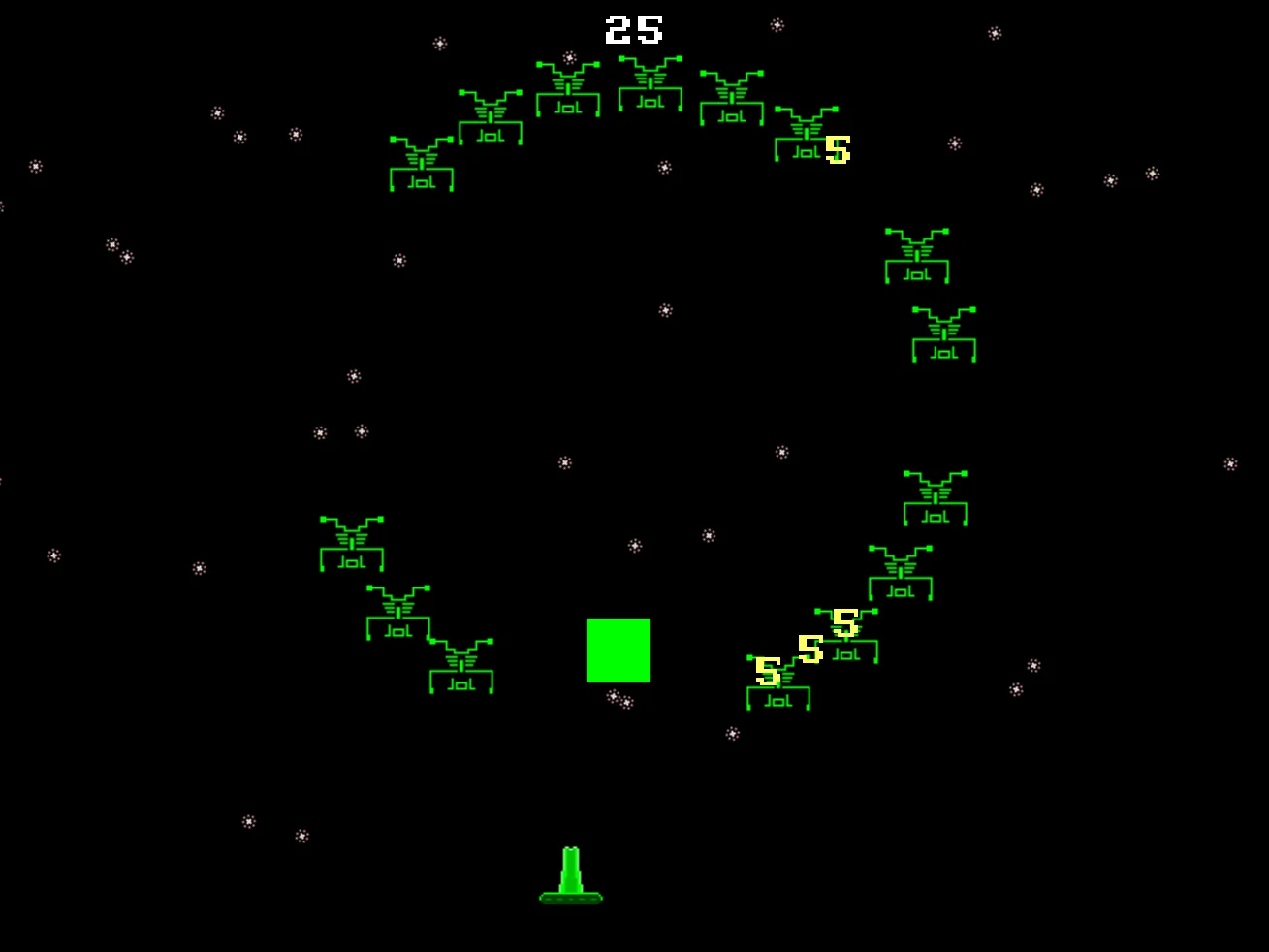
Now you're shooting with power!
Our game, so far.
// My Game
// by Mr Green
// Created 2025/12/16

Symbol 0,"2__0_0_0_0_0_0_0_0_0_0_0_0_0_0_0_0_0_0_0P?0_0/P?0!P0,P0_0/P0,P0?P,00P0_0/P00P,0.P,00P0_0/P00P,0.P,00P0_0/P00P,0.P,00P!0!P!00P,0_0?P@0_0_0_0_0_0/P!0.P!0_0_0_0_0_0.P?0PP0P?0_0_0!PP0_0_0/P.0PP0P.0_0_0/PP0_0_0_0,PP0_0@P_P,0PP0P_P,0.P0_0_0@P0.P0_0_0@P0.P0_0_0@P0.P0@P0@P0@P0.PP0/P0@P0/PP0?P0/P0P!0P0/P0!P?0,P0@P0,P?0@P,0,P0@P0,P,0_0?P,0@P,";
Symbol 1,"2__0_0_0_0_0_0_0_0_0_0_0_0_0_0_00P,0_0_0@P_P,0_0?P_P,0?P0_0?P0?P,0@P0_0?P0_0/P0_0?P0_0/P?0!P?0_0_00P0!P0_0_0!P@0_0_0_0_0_0/P!0.P!0_0_0_0_0_0.P?0PP0P?0_0_0!PP0_0_0/P.0PP0P.0_0_0/PP0_0_0_0,PP0_0!P_P?0PP0P_P!0_0_0_0,PP0_0_0_0,PP0_0_0_0,PP0_0P0@P0_0PP0_0P0@P0_0PP0_0P0P!0P0_0PP0_0P0P0.P0P0_0PP0_0P0P0.P0P0_0P,0/P,0P!0P,0/P.0_0_0_0P.0_0_0_0PP";
Symbol 2,"2__0_0_0_0_0_0_0_0_0_0_0_0_0NN00NN0_0_0/NPQNNQPN0_0_0!NPQ.PN0_0_0!NPQ.PN0_0_0!NPQ.PN0_0_0!NPQ.PN0_0_0!NPQ.PN0_0_0!NPQ.PN0_0_0!NPQ.PN0_0_0!NPQ.PN0_0_0!NPQ.PN0_0_0!NPQ.PN0_0_0?NPPQ.PPN0_0_0.NPPQ.PPN0_0_0.NPPQ.PPN0_0_0.NPPQ.PPN0_0_0.NPQ!PN0_0_0.NPQ!PN0_0_0.NPQ!PN0_0_0,NPPQ!PPN0_0_00NPPQ!PPN0_0_00NPPQ!PPN0_0_00NPPQ!PPN0_0,P_P_P_P0,PS_S_S_SP0PS_S_S_S,PPSSR,S,R,S,RRS,R,S,R,SSP0S_S_S_S,0,S_S_S_S";
Symbol 3,"2__P_P_P_P_P_P_P_P_P_P_P_P_P_P_P_P_P_P_P_P_P_P_P_P_P_P_P_P_P_P_P_P_P_P_P_P_P_P_P_P_P_P_P_P_P_P_P_P_P_P_P_P_P_P_P_P_P_P_P_P_P_P_P_P_P_P_P_P_P_P_P_P_P_P_P_P_P_P_P_P_P_P_P_P_P_P_P_P_P_P_P_P_P_P_P_P_P_P_P_P_P_P_P_P_P_P_P_P_P_P_P_P_P_P/";
Symbol 4,"2__0_0_0_0_0_0_0_0_0_0_0_0_0_0_0_0_0_0_0_0_0_0_0_0_0_0_0_0_0_0_0_0_0_0_0_0_0_0_0_0_0_0_0_0_0_0_0_0_z0_0_0_0020,20_0_0_00;0_0_0_0z0;1;0z0_0_0_0;0_0_0_0020,20_0_0_00z";

// Arrays
Dim EnemyAlive(20)

// Main Loop
GameRun=0
Repeat
  If GameRun==0 then Gosub .StartScreen
  If GameRun==1 then Gosub .InGame
Flip
Forever


// This is our Titlescreen
.StartScreen
CLS
ResetDraw

  ShowInvader=1
  If Wrap(Frames,0,20)<10 Then ShowInvader=0
  DrawImg 320,160,ShowInvader

  SetFontSize 32
  Text 320,240,"Titlescreen!",1
  SetFontSize 16
  Text 320,360,"Press Fire to Play",1

  If GamePad(ButtonA)
    Gosub StartGame
    GameRun=1
  Endif
Return


// This prepares our game when the A Button is hit
.StartGame
  Score=0
  PlayerX=320 // Middle of the screen
  PlayerY=440 // Bottom of the screen

  BulletX=0  // Reset player's bullet
  BulletY=0

  For BadGuy=1 to 20
    EnemyAlive(BadGuy)=1
  Next

Return


// This is our ingame loop
.InGame
CLS
ResetDraw
  // Starfield using Symbol 4
  Starfield 1,0,4

  // Player
  DrawImg PlayerX,PlayerY,2
  Speed=4
  If GamePad(ButtonLeft)>0.5 then PlayerX=PlayerX-Speed
  If GamePad(ButtonRight)>0.5 then PlayerX=PlayerX+Speed
  // Using >0.5 allows players to use a thumbstick, too!

  PlayerX=Limit(PlayerX,32,640-32)


  // Player's Bullet
  // Keep the Bullet going upwards
  BulletSpeed=16
  BulletY=Limit(BulletY-BulletSpeed, -100,480)
  // Draw the Bullet
  BulletCollide=DrawImg(BulletX,BulletY,3)

  If BulletY<0 And GamePad(ButtonA)
    BulletX=PlayerX
    BulletY=PlayerY
    PlaySFX("Lazer_2")
  EndIf


  // Enemy Section

  // Reuse this to keep the invaders animated
  ShowInvader=1
  if Wrap(Frames,0,20)<10 then ShowInvader=0

  CircleSize=160
  Gap=15
  // A loop for 20 Bad Guys
  For BadGuy=1 to 20

    // If Alive
    If EnemyAlive(BadGuy)==1

      // Each enemy should be further around the loop.
      PlusAngle=BadGuy*Gap
      Angle=Wrap(Frames + PlusAngle,0,360)
      EnemyX=320+Cos(Angle)*CircleSize
      EnemyY=200+Sin(Angle)*CircleSize

      // New collision code
      EnemyCollide=DrawImg(EnemyX,EnemyY,ShowInvader)
      If Collide(BulletCollide,EnemyCollide)
        // If the bullet hits the Enemy

        // Turn off the Enemy
        EnemyAlive(BadGuy)=0
        // Make a Bang sound
        PlaySFX("Explode_Low_2")
        // Gimme 5 points!
        Gimme 5,EnemyX,EnemyY

        // Move the Bullet off the screen
        BulletY=-100
      EndIf // Collision

    EndIf // Alive

  Next // Each BadGuy


  // Quit button (Return)
  If GamePad(ButtonStart) then GameRun=0
    // We can hit the Return key to quit

  SetFontSize 16
  Text 320,16,Score,1
Return
In the EnemyX and EnemyY lines, the Sin and Cos commands always work with Angle as a simple number.
If you multiply the Angle in either of the Sin or Cos, the movement of the enemies changes, and they no longer do a simple circle.
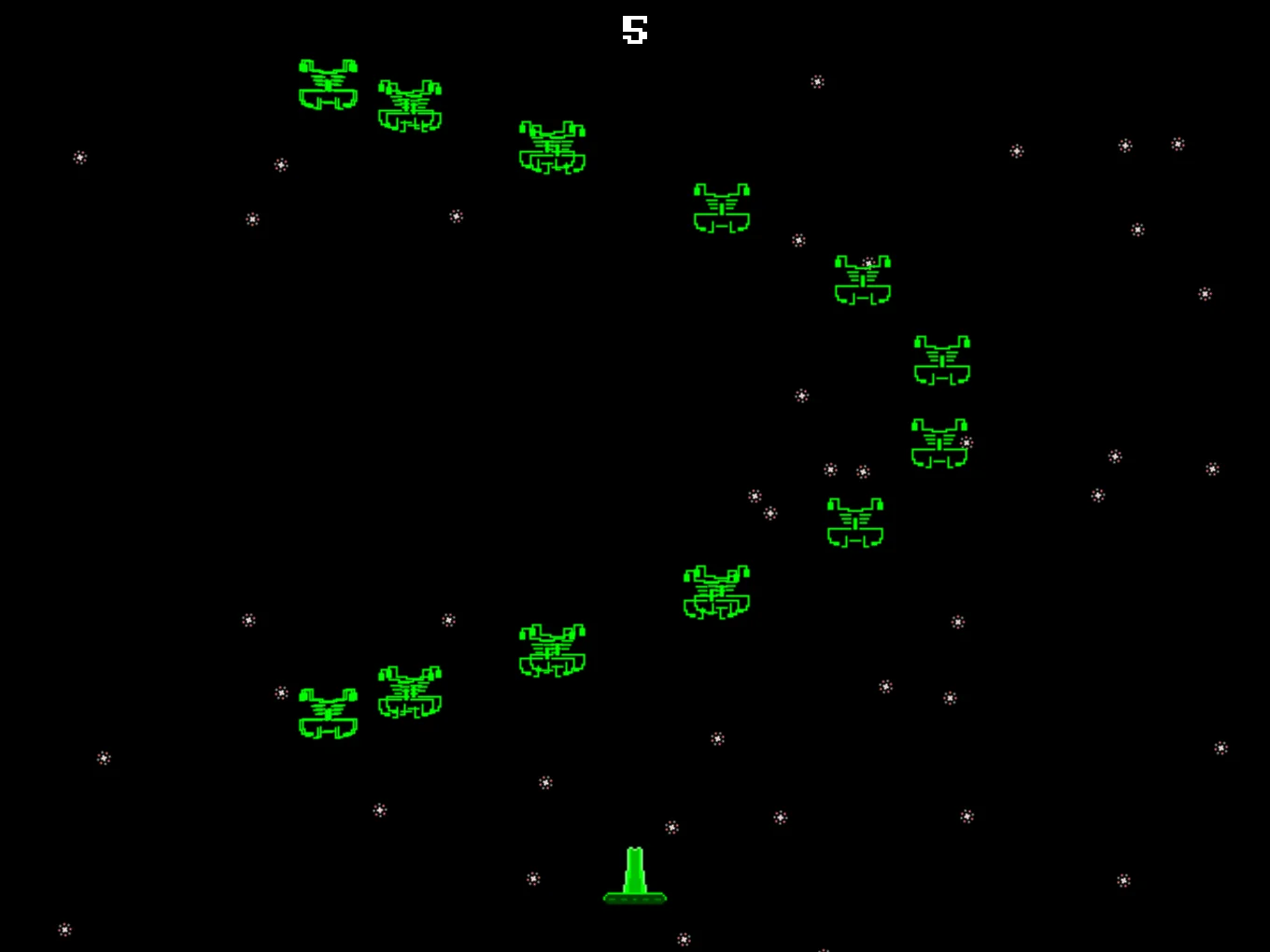
Ooh, they can do different paths!
What patterns can you create?